
Savings.com DealHound FAQ
1. What is the Savings.com DealHound?
The Savings.com DealHound shows you when coupons and deals are available while you are shopping online.
2. How does the Savings.com DealHound work?
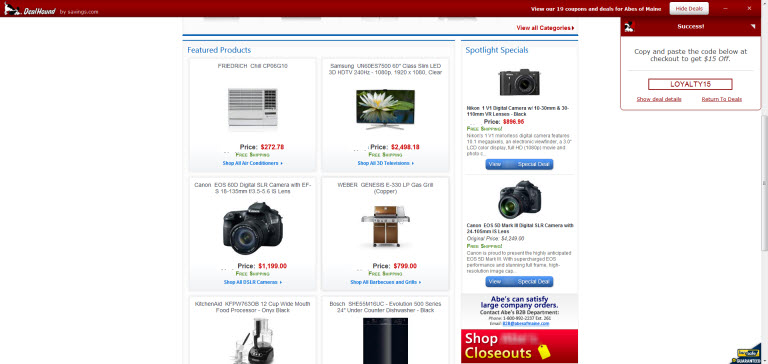
Some coupons require that you enter a “Coupon Code” at checkout to receive the discount. If the deal you choose requires a “Coupon Code,” you will be presented with the code in the DealHound slide down window. Simply copy and paste that code at checkout and you’re done. Not all coupons require a coupon code. Some coupons may be automatically applied to your cart at checkout.
For more information about online coupons and coupon codes, please see this FAQ on Savings.com.
3. When does the Savings.com DealHound show up?
The Savings.com DealHound only shows up when there is a coupon or deal available for the website on which you are shopping.
Here’s an example of what you’ll see:
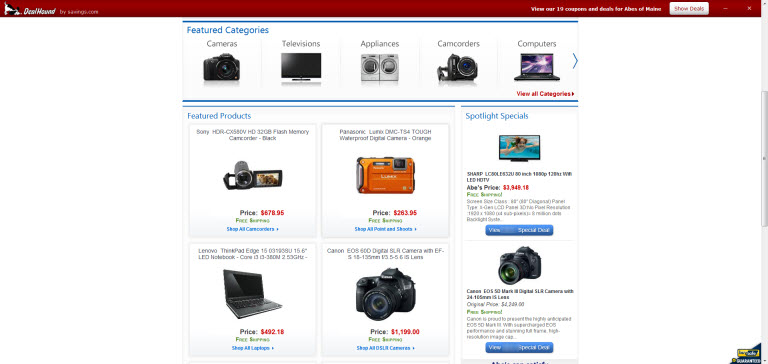
If you click “Show deals” the offers will appear in the DealHound slide-down window:
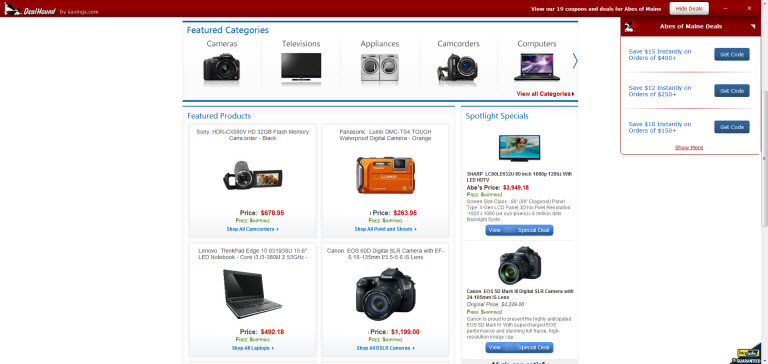
If you are using a coupon that requires a code the coupon code will be presented to you after you click “Get Code”, like this:
4. How does the Savings.com DealHound know when coupons and deals are available?
Savings.com works hand in hand with top retailers and brands to make sure we‘re providing the very best offers. That means our savings come straight from the source including hundreds of exclusive deals that you won‘t find anywhere else. Our dedicated team of deal hunters make sure you find the best stuff first, so there‘s no need to spend all that time sifting through expired coupons and codes that don‘t work.
5. What if I’m not interested in using the Savings.com DealHound?
You can uninstall it by following the instructions below:
IE: visit this page on the Microsoft website for details on how to uniinstall
Chrome: visit this page on Google’s website for details on how to uninstall
Firefox: visit this page on Mozilla’s website.
For users of Conduit toolbars: http://support.conduit.com/HelpCenter/Uninstall